

Can Marketo be suitable for B2C marketing?
Marketo (currently Adobe) does not natively support e-commerce because the system was designed for the B2B market. Of course, Adobe handles e-commerce through the Adobe Commerce platform (formerly Magento), which offers 9 different filters based on machine learning. Using this, aside from financial considerations and the need to have a store on Adobe Commerce, is neither straightforward nor pleasant.
Therefore, Quarticon AI-mails is a must-have for e-commerce companies, media, and classifieds services using Adobe Marketo. Quarticon enables embedding of personalized product offerings or content in Marketo with virtually no integration. Quarticon represents an important supplement to Adobe Marketo’s functionality, especially for e-commerce.
See below how Marketo and Quarticon can be effectively combined.
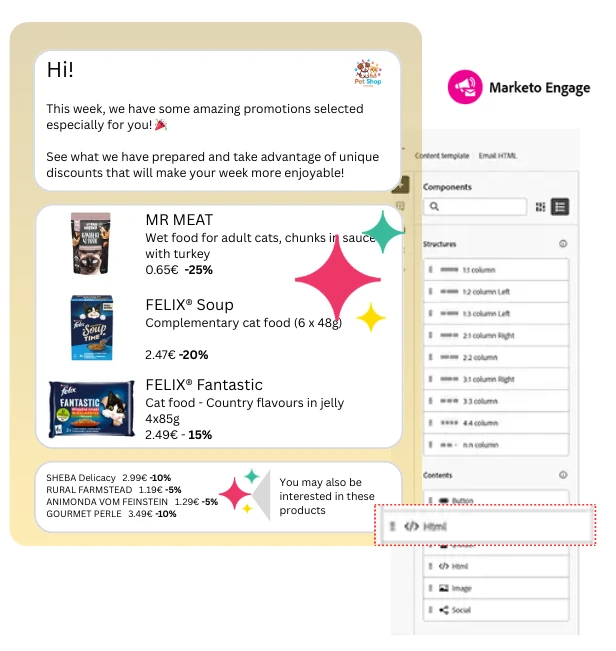
What are the main issues in Marketo Engage affecting the e-commerce sector?
Marketo does not offer functionality that allows for using this tool in e-commerce. Instead of product personalization for e-commerce, AI in Marketo tracks user behavior to automatically recommend content (e.g., case studies, reports, webinars, or blog posts). This does not allow for the application of the system in e-commerce.
Quarticon AI-mails enables easy, integration-free addition of personalized product offerings sent in Marketo Engage and thus allows for applying this tool in e-commerce.
Is Quarticon + Marketo a good solution for e-commerce?
Quarticon is a decision engine that matches product offerings for each user individually in real time. It operates in every channel. The Quarticon AI-mails solution enables effective use of Marketo Engage in e-commerce, turning it into a platform whose capabilities will begin to match Salesforce-type solutions and even surpass them thanks to the complete autonomy of the solution! Incorporating Quarticon product blocks into email campaigns in Marketo is a proven way to increase conversions and enable automatic product offerings in emails sent from Marketo.
Whether you’re running a sale, launching new products, or sending reminders, up-to-date and personalized products make your emails more engaging and action-driven. AI based true 1:1 personalization and product recommendations boost conversions 3 times!
How to embed personalized product offerings in Marketo Engage?
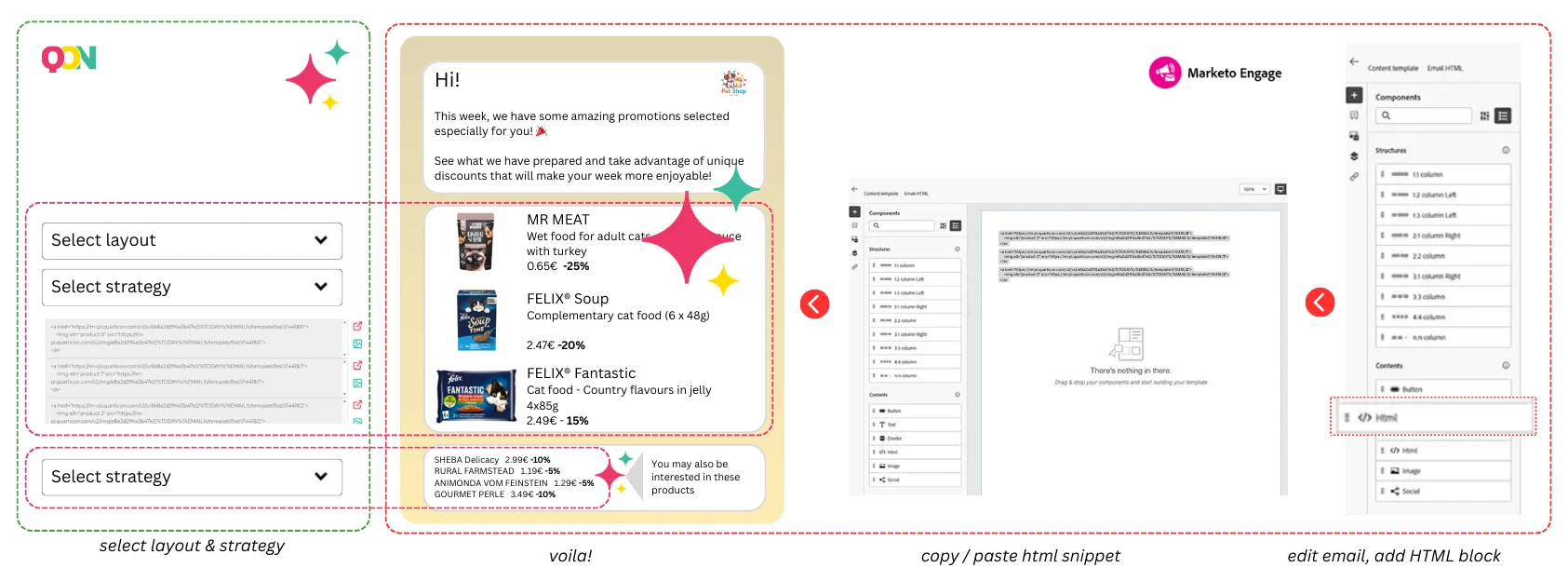
Step 1. Generate a snippet in Quarticon
1. Login / set up your account in Quarticon and navigate to AI-mails module
2. First, create a product card template. Customize the appearance by defining size, colors, fonts, layers and much more. Select layout and elements to be displayed, including product name, image, price, previous price, discount or whatever you want.
3. Next, define targeting strategy. There are available regular product suggestions and AI-based recommendations. Regular product suggestions include: bestsellers, popular products, trending within last 7 days, trending in the last 24 hours, last viewed products, abandoned cart. AI-based product recommendations include Recommended for you, popular personalized, cross-selling, up-selling, cross-selling to the abandoned cart, cross-selling to the abandoned session and many more.
4. Copy the generated HTML snippet – this should be inserted into your email template in the next step.
Step 2. Add a product block to an email in Marketo
- Open Marketo and navigate to the “Email” section.
- Create a new email message by selecting the “New Email” option in the “Marketing Activities” section, choose an existing message template, or start from scratch. If a template is selected, it can be further customized.
- In the email editor, find the HTML Source Code button (usually marked with a </> icon) and click it. This will enable direct editing of the HTML code.
- Paste the HTML code in the chosen location in the editor.
- Save it. After adding the HTML code, use the Preview function to check how the email displays. It is recommended to send a test email to verify that everything displays correctly across various email clients.
Best Practices for Product Blocks in Marketo Engage
- Ensure optimization for mobile devices by verifying that the block displays correctly across various devices.
- Conduct A/B tests regarding block placement and appearance to try different positions and styles and determine which ones perform best.
- When using the same product tile view, it is sufficient to modify the strategy identifier to adapt the block for the next email to be sent in Marketo. Simply copy and paste the block, then change the strategy identifier, for example from “trending now” to “new arrivals”.
- This applies only when intending to change the strategy. If not—modify the content in the next message while keeping the block unchanged.
- Create standalone emails in Marketo, such as “Products of the Week” or “Weekly Promotions Available Now”. The product block based on Quarticon AI-emails will adapt the displayed products.
- No additional steps are required to enable personalized product emails in Marketo. Products presented in email campaigns will be customized individually for each user.
Key Features of Quarticon AI-emails
Automatically create offers featuring new arrivals
Automatically include new arrivals from your store in emails, newsletters, and even notifications sent from your e-commerce platform.
All you need to do is set it up once in the notification template!
Automatically create PDF newsletter-style emails
Sending PDF newsletters via email is a relic of the past. PDF offers are sent only because structuring an email, for example, with 30 products embedded in the message, is a very complicated and time-consuming task. But not with Quarticon AI-emails.
Embedding 1 product takes 5 seconds; embedding 30 products takes 5 seconds × 30—and it’s a one-time task.
Cross-sell offers in your email campaigns
“Other customers also bought” offers will be available without the need for integration or system upgrades. True 1:1 personalization
Even more possibilities
Learn more about the revolutionary AI-mails service.
How to Start Using Quarticon?
See how to start using Quarticon tools. Integration depends on the type of shop platform. Quarticon works with all shop platforms. The instruction below is universal for all, though in many cases integration will be even simpler.
1.
Create a free account in Quarticon
Sign up for a free Quarticon account and get access to the Quarticon apps, including the AI-Emails module.
2.
Add Quarticon’s Universal Tag
Copy the code snippet to your website. It’s very simple, but you’ll also receive instructions via email.
3.
Add product feed
You can select a product feed (in any format, such as Google Merchant, etc.) or use a pre-built app on the e-commerce platform that integrates your product offerings
4.
Create the product card layout
Use the builder to create the product card layout for your email campaigns. Next select strategy of filtering products or running personalized AI recommendations. And that’s all. Now all you have to do is copy the snippet into your email template.
Frequently asked questions about Living Emails
What is Quarticon Living Emails?
Quarticon Living Emails is a service that provides content personalization in mailings and web push (and beyond) in any marketing automation system. Decisions about product or content selection are made by the Quarticon decisioning engine, based on proprietary predictive models (pAI).
With Living Emails you can easily embed a personalized product block in any system (marketing automation, email platform, CDP, etc.) and in environments that do not support JS. Effortless, integration-free, it provides a consistent experience across all communication channels, eliminating 90–95% of the tasks and effort involved in preparing a personalized and up-to-date product offer in emails.
You can learn more about the product here: personalized living e-mails
Does Quarticon Living Emails rely on generative artificial intelligence?
No, the system does not use generative artificial intelligence at all (such as ChatGPT, Gemini, Claude, Mistral, etc.). It uses proprietary predictive AI algorithms trained to match product offers and content. Therefore the system will not write your newsletter intro for you. But it will populate it, for example, with products that are tailored to each recipient of the newsletter individually.
Will every email recipient get an individually selected offer?
Yes. The AI-mails service, at a higher package level, allows individual tailoring of the offer to the user based on their previous purchases and on-site behavior and clicks in sent emails. Offer management is handled by the Quarticon decisioning engine populated by Living Emails.
Does the product offer in the email refresh in real time?
Exactly! The product offer refreshes in real time and individually for each email recipient. Every time the user opens the email you can be sure the offer in the email content will be up to date. This helps achieve better alignment with each recipient’s current needs and, of course, positively impacts conversions.
Can I change the product offer after sending the email?
Everyone will tell you that’s a silly question and of course not.
But not with Quarticon Living Emails! The offer changes dynamically between sending and opening. Top-sellers sold out in the meantime? No problem. The system will select other well-selling and available products.
Do I need a developer to start using Quarticon Living Emails?
No, you do not need a developer to use Quarticon Living Emails. The system does not require any complicated integration with either the sending system or the e‑commerce platform. That’s the beauty of it. Launching Quarticon in your store will take you just a few minutes using the step-by-step instructions in the panel.
Can I get help integrating Quarticon Living Emails in my store?
Yes, our support plan provides full assistance with integration. Quarticon offers a wide knowledge base and 24/7 technical support, making it user friendly.
Can I adapt the product appearance to my email template?
Yes. In the user panel you have access to the product card designer. You can create any templates containing photos, prices, product names, or only product names, in a horizontal or vertical layout. At the end you define which template to use and which product display strategy, and a ready snippet for your mailing is generated.
Is It Necessary to Give Up Marketo to Use Quarticon?
No, it should not be necessary to give up the system and migrate the database to use Quarticon products. Quarticon snippets should be added to email templates in Marketo, and that is all that is needed for personalized emails for e-commerce to start working.
Other Topics That Might Be of Interest:
- Recommendations and recommendation engines. Simple explained. The question is about conversion, sales and how to stop causing harm to your users immediately.
- Enhance Marketo functionality for targeted campaigns. Take email marketing to the next level with this game-changing integration with Quarticon AI-mails
- Marketing automation was supposed to be a game-changer for e-commerce businesses. It become a source of frustration, complexity, and unexpected costs.