
Quarticon is a must-have for Marketo e-commerce clients
Save 90-95% of your time and effort!
Add and automate product blocks in your e-mailings with Quarticon agentic AI-mails
Product blocks are one of the most powerful tools for increasing conversions in your Marketo Engage (Adobe) email campaigns. Whether you’re advertising a flash sale, product launch, abandoned cart reminder, or recommending new products for the customers, incorporating Quarticon’s AI-mails enhances your mailings and drives action in your emails.
In this guide, we’ll show you how to embed an Quarticon AI-mails in Marketo emails and share effective strategies to maximize its effectiveness.
Step 1. Generate a snippet in Quarticon
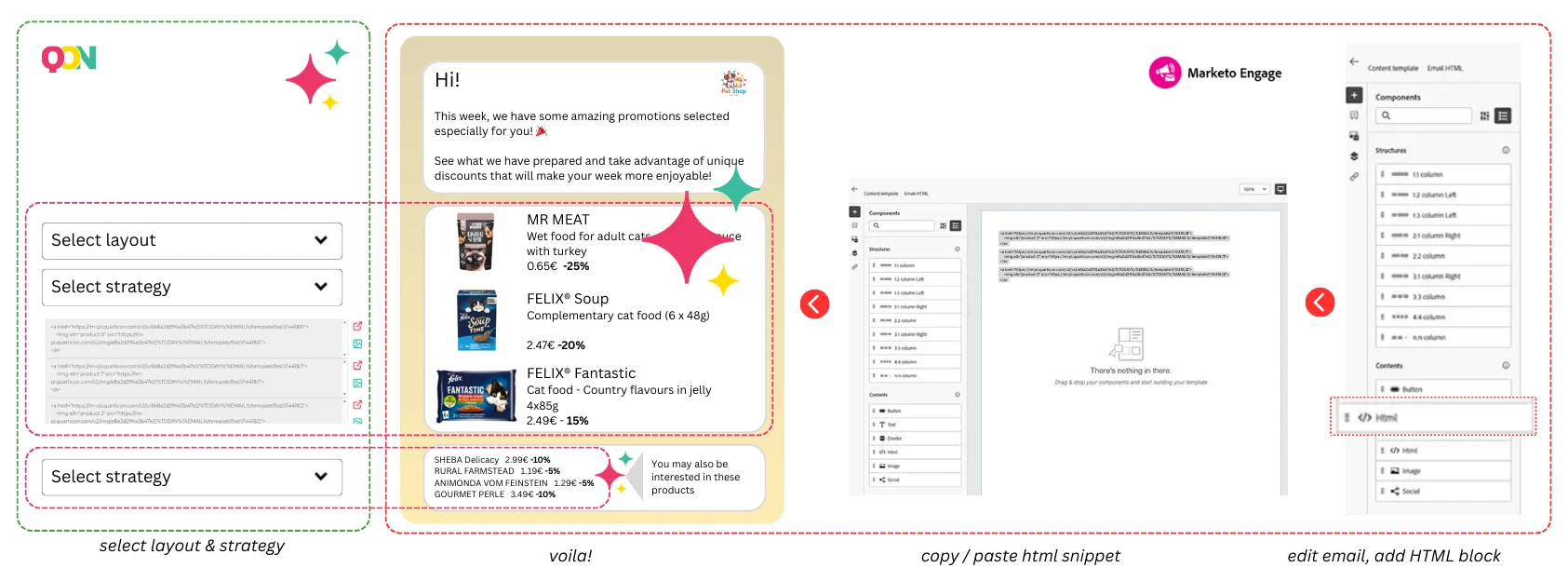
1. Login to Quarticon and navigate to AI-mails tools
2. Create a snippet template. Customize the appearance by defining size, colors, fonts. Select layout and elements to be displayed, including product name, image, price, previous price, discount or whatever you want.
3. Define targeting strategy. You can define non-AI-based strategies and AI-based strategies. Non-AI based strategies will include: bestsellers, popular products, trending withing 7 days, trending in last 24 hours, last viewed products, abandoned cart. AI-based strategies can include Recommended for you, popular personalized, cross-selling, up-selling, cross-selling to the abandoned cart, cross-selling to the abandoned session and many more.
4. Copy generated HTML snippet – this will be inserted into your Marketo email template.
Step 2. Add product block to your Marketo email
1. Open Marketo and navigate to the Email section.
2. Choose to create a new email by selecting New Email from the Marketing Activities section or choose an existing email template or start from scratch. If you select a template, you can customize it further.
3. In the email editor, locate the HTML Source button (usually represented by a </> icon) and click on it. This will allow you to edit the HTML code directly.
4. Paste your HTML code into the editor where desired.
5. Save it. After adding the HTML code, use the Preview function to see how the email renders. It’s recommended to send a test email to yourself to verify that everything displays correctly across different email clients.
Best practices for product blocks in Marketo
- Ensure mobile optimization by verifying that the block displays correctly on various devices.
- Conduct A/B testing on placement and design to experiment with different block positions and styles, identifying what performs best.
- If you use the same layout you can just modify the strategy ID to adjust the block for the next email to be sent in Marketo. Simply copy-paste the block and change strategy ID from. e.g. “tredning now” to “new arrivals”.
- Modify the copy in the next mailing while keeping the block intact. Adjust the products as needed.
- Create autonomous emails in Marketo, such as “This Week’s Trending Products” or “Weekly Discounts Available Now.” The product block powered by Quarticon AI-mails will adjusted displayed products.
- No additional steps are needed to enable personalized product emails in Marketo. The products featured in your email campaigns will be tailored to each user individually.
Final thoughts about Marketo and Quarticon’s product blocks
Integrating Quarticon’a product blocks into your Marketo email campaigns is a proven way to increase conversions while saving up to 90-95% of your effort and time. Whether you’re launching new products, running a sale or sending reminders, up-to-date and personalized product makes your emails more engaging and action-driven.
Frequently Asked Questions about product blocks in Marketo
Do Quarticon product blocks update in real time?
Yes! Products blocks refresh automatically for each recipient every time they open the email, ensuring an accurate product recommendations to maximize the efficiency of the campaign.
Can I create personalized product block for each subscriber?
Yes! Quarticon product blocks adjust per subscriber, making them perfect for personalized email campaigns. The product selection is handled in real time by Quarticon’s proprietary predictive AI models.
What happens when my sale offer expires?
Once the sale offer expires, the product block will automatically update to showcase the current offerings, featuring discounted products. If there are no discounted items available, a fallback strategy will kick in, displaying best-selling products instead. This ensures that the email content changes after sending, providing recipients with an up-to-date offer, as sold-out items are removed in real time.
About Quarticon
Quarticon was established in Warsaw, Poland in 2010.
The company has built its proprietary prediction AI models that help increase conversions and sale in e-commerce stores.
Quarticon is present with its famous AI product recommendations in several countries, including Poland, Czech Republic, Slovakia, Hungary, Croatia, Serbia.
AI-mails, launched in 2025, bridge the gap between on-site experiences and marketing automation.
With zero hassle and no integration required, it delivers a consistent experience across all communication channels, eliminating 90-95% of the tasks and effort involved in preparing personalized and up-to-date product offerings in emails.
Open Marketing has recognized us as an essential tool for marketing automation in e-commerce by 2026.
How to start working with Quarticon AI-mails?
You will receive a complete guide once you subscribe our product. Generally, it’s easy as ABC. Account-snippet-catalog. No further integrations between Quarticon and Marketo is needed. Your store is the heart of the system. Quarticon and Marketo will communicate through the heart.
1.
Create an account in Quarticon
Create a free account in Quarticon and subscribe products of your selection.
2.
Add Quarticon’s Universal Tag
Add a simple JS snippet directly to your site.
3.
The last step
Depending on your cart platform, we will fetch your product catalog either with API, or from the product feed.

Enhance Marketo functionality for targeted campaigns. Take email marketing to the next level with this game-changing integration with Quarticon AI-mails