
Quarticon is a must-have for Eloqua e-commerce clients
It enables dynamic product recommendations in Eloqua without any integration! Add and automate product blocks in your e-mailings with Quarticon agenitc AI-mails.
Product blocks (recommendations) are one of the most powerful tools for increasing conversions in your Eloqua email campaigns. Whether you’re advertising a flash sale, product launch, abandoned cart reminder, or recommending new products for the customers, incorporating Quarticon’s AI-mails enhances your mailings and drives action in your emails.
In this guide, we’ll show you how to embed an Quarticon AI-mails in Oracle Eloqua emails and share effective strategies to maximize its effectiveness.
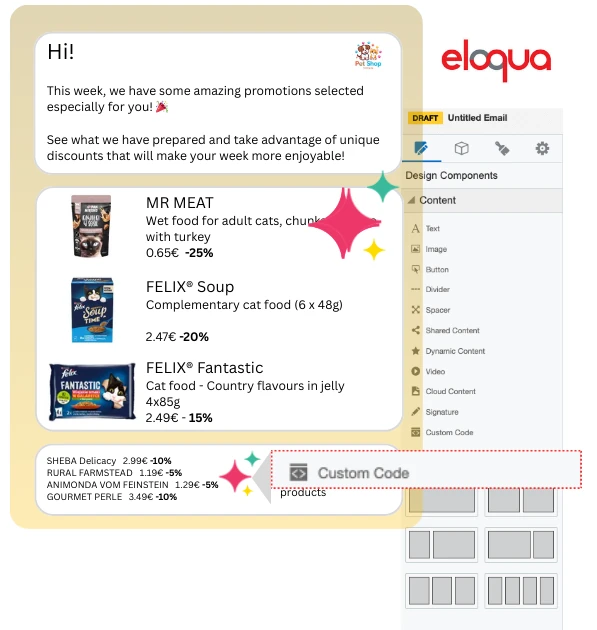
Step 1. Generate a snippet in Quarticon
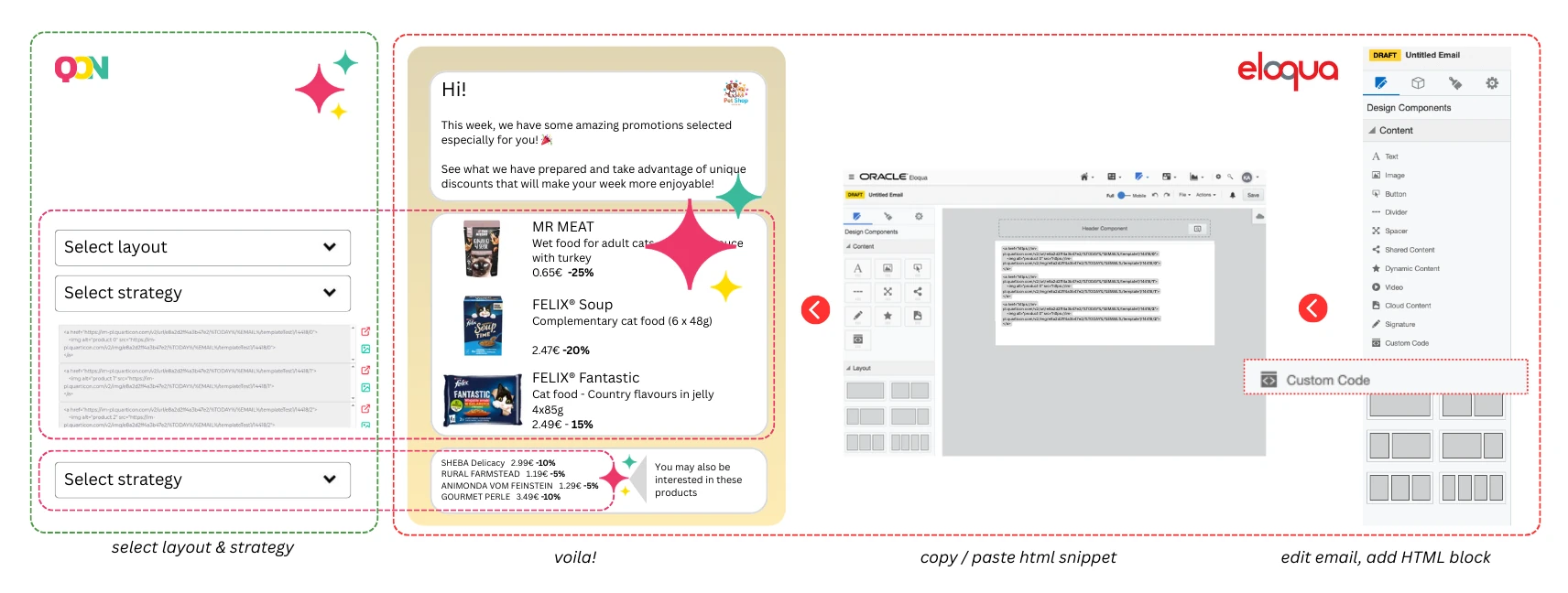
1. Login to Quarticon and navigate to AI-mails tools
2. Create a snippet template. Customize the appearance by defining size, colors, fonts. Select layout and elements to be displayed, including product name, image, price, previous price, discount or whatever you want.
3. Define targeting strategy. You can define non-AI-based strategies and AI-based strategies. Non-AI based strategies will include: bestsellers, popular products, trending withing 7 days, trending in last 24 hours, last viewed products, abandoned cart. AI-based strategies can include Recommended for you, popular personalized, cross-selling, up-selling, cross-selling to the abandoned cart, cross-selling to the abandoned session and many more.
4. Copy generated HTML snippet – this will be inserted into your Brevo email template.
Step 2. Add product block to your Eloqua email
1. Open Eloqua and navigate to the Email section.
2. Create or edit an email or a template.
3. Open the email design editor by clicking on the email name.
3. Drag an “HTML” block into your email design.
4. Double-click on the HTML placeholder and paste the Quarticon HTML snippet into the HTML Editor field.
5. Save and preview your email to ensure the product block displays correctly.
Best practices for product blocks in Eloqua
- Ensure mobile optimization by verifying that the block appears correctly on various devices.
- Conduct A/B testing for placement and design to identify the most effective configurations for your blocks.
- If you maintain the same layout, simply adjust the strategy ID to update the block for the next email in Eloqua. You can easily copy and paste the block, changing the strategy ID from, for instance, “trending now” to “new arrivals.”
- Update the copy for the next mailing (keeping the same strategy) while leaving the block unchanged. The products will be updated accordingly.
- Create automated emails in Eloqua, such as “Trending This Week in Our Store” or “Discounted Products This Week.” The product block powered by Quarticon AI will automatically adjust the displayed products.
- No further actions are needed to run personalized product emails in Eloqua. The products shown in your emailing campaign will be tailored at the user level.
Final thoughts about Eloqua and Quarticon’s product blocks
Integrating Quarticon’a product blocks into your Eloqua email campaigns is a proven way to increase conversions and enable automated product offering in Eloqua e-mails. Whether you’re running a sale, launching new products, or sending reminders, up-to-date and personalized product makes your emails more engaging and action-driven.
Frequently Asked Questions about product blocks in Eloqua
Do Quarticon product blocks update in real time?
Absolutely! The product blocks refresh automatically for each recipient every time they open the email, guaranteeing an accurate selection of products to enhance the effectiveness of the campaign.
Can I create personalized product block for each subscriber?
Yes! Quarticon product blocks adjust per e-mail subscriber. It’s perfect for personalized email campaigns. The product selection is handled in real time by Quarticon’s proprietary predictive AI models.
What happens when my sale offer expires?
Once the sale offer expires, the product block will be updated with the current offerings featuring discounted products. If there are no discounted items available, it will switch to a fallback strategy, displaying best-selling products instead. This means the email content dynamically changes after it’s sent, ensuring recipients always receive up-to-date offers, with sold-out items removed in real time.
About Quarticon
Quarticon was established in Warsaw, Poland in 2010.
The company has built its proprietary prediction AI models that help increase conversions and sale in e-commerce stores.
Quarticon is present with its famous AI product recommendations in several countries, including Poland, Czech Republic, Slovakia, Hungary, Croatia, Serbia.
AI-mails, introduced in 2025, bridge the gap between on-site experiences and marketing automation.
With seamless functionality and no integration required, it delivers a consistent experience across all communication channels while eliminating 90-95% of the tasks and efforts involved in preparing personalized and up-to-date product offerings for email campaigns.
Open Marketing has recognized it as an essential tool for marketing automation in e-commerce for 2026.
How to start working with Quarticon AI-mails?
You will receive a complete guide once you subscribe our product. Generally, it’s easy as ABC. Requires 3 steps: account-snippet-catalog. No further integrations between Quarticon and Eloqua is needed. Your store is the heart of the system. Quarticon and Eloqua will communicate through the store.
1.
Create an account in Quarticon
Create a free account in Quarticon and subscribe products of your selection.
2.
Add Quarticon’s Universal Tag
Add a simple JS snippet directly to your site.
3.
The last step
Depending on your cart platform, we will fetch your product catalog either with API, or from the product feed.
Quarticon’s AI-mails can enable creating personalized emails with product offers in Oracle Eloqua. A must-have for e-commerce clients